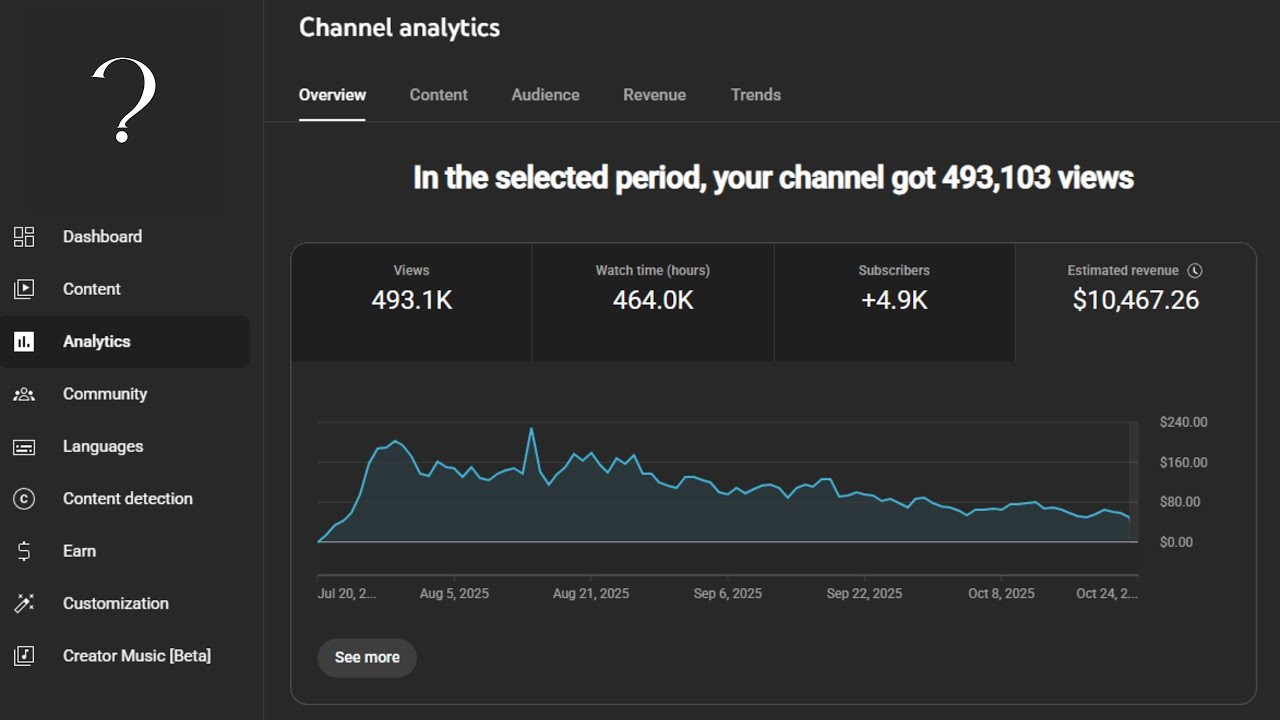
Hey everyone, Cody here and today I want to show you how I made $10,000 in about 90 days on YouTube with AdSense revenue alone using long- form sleep videos. What do I mean by that? Well, essentially they're videos to fall asleep to on YouTube and then kind of ads run in the background. What I found is a lot of people actually don't fall asleep to them. Um, they actually watch a lot of them or they'll just put them on in the background and then the ads play. Anyway, um, so how did I even find out
about this? Uh, I found out about it because of a tool called Tube Genen. Um, and a guy named Eddie Eisner who started Tube Genen. And essentially, Tube Genen creates these sleep videos for you. However, I found the tool to be kind of expensive. Um, but I did find out the method because of him. And I'm going to show you the channel in just a second. But I'm not recommending Tomb Genen. I will have a link for it if you want to check it out and end up using it. Great. I'll get paid. If you
don't use it and you follow the method I'm going to show you, then that's cool, too. Um, and I'm not going to gatekeep. I'm not going to hold anything back. I'm going to show you the entire process from start to be, you know, start to finish. Um, although it may not be as extensive as I'd like, but again, no course, no, you know, I don't have any product to sell or anything. Um, and the reason I'm even showing you is because the channel is dying off anyway. So, it's like it doesn't really benefit me. But
if you want to go check the channel out and you know watch some of the videos, great. Okay, so some of the pros and cons to a sleep channel. Uh they are quick and easy to make. The content is very simple. It's very straightforward. Um so it's kind of quick to make the videos. Um but some of the cons or the problems is one they rise and fall quickly. So they they like go up really easily but they also kind of come down really easily. um easy come easy go type thing. Also, it's very saturated
in a lot of niches. You may have seen these channels like boring history for sleep or, you know, boring sleep, you know, pirates or, you know, whatever, right? It doesn't matter. There's a lot of channels like this in different niches. Now, it can still work. You just need to find a niche that is not saturated. I've seen people do it on space. I've seen people do it on, you know, phobias. I've seen people do it on the sea or whatever, right? Just find something that you know you're interested in and then you can make these
sleep videos. Um, but I do find them to be unsustainable. Every channel that I've seen that was started with these kind of channels, okay, let's not say every, but about 99% of the channels that even get monetized and make money, they fall off after a couple months. Um, and again, this guy Eddie Eisner, he I've seen some of his channels and they got monetized within a couple weeks and they made, you know, maybe a few thousand dollars and then they just dropped off and he started another one. It's very unsustainable is what I mean. So,
I'm going to show you my channel in just a second and you'll see what I mean. So, I've got all the steps here. We're going to go through all these steps. Um, again, it's not going to be super in-depth. You're going to have to do some work. Um, but I will kind of go over the entire process with you. Okay. All right. So, let's go ahead and put this one aside and I'm gonna show you my channel. So, this is the channel. It's called Lore to RPG. If you want to check out the channel, I
actually like the channel even though it's a sleep channel. I I actually do care about it and it is a cut above a lot of these other AI slop videos. Could you classify it as AI slop? Probably. Yeah. I mean, you could say that honestly. Um, but I do care about, you know, the quality, and you're going to see why I say that. Anyway, so you can see here, I'll go ahead and refresh it. Um, I've gotten 400,000 views, which is not a crazy amount, um, in the last 3 months, but I started it July
1st. I literally started on the first day of July and got monetized within three weeks. Um, I feel like it's kind of a fluke because a lot of these channels don't get monetized that fast, but I did. Um, the key to that is uploading like three plus videos a day. And all these videos are like around two hours. So, it getting that watch time is the biggest thing. And actually, um, I'm going to I'm going to go ahead and add another thing here that we're going to talk about. And I'm going to move this to
the side. And I'm going to log into this because this is actually something I kind of forgot about and has to do with live streaming. Um, and this is kind of a um a cheat code. Actually, it's not going to let me log in, so I'll just I'm going to put a link to it and I'll talk to it. But anyway, let's come back. So, anyway, you can see I've made $10,000 um in about 90 days. It's not life-changing income, but it is income nonetheless. Um, my best month was about 4,000. So, this whole what
am I talking about? You know, let me just kind of back up a little bit here. Okay, so this essentially what this channel is is it has videos for people to fall asleep to. It's that straightforward. Um, a lot of the videos I do are on video game lore. And I chose this niche because I love video games. Um, I grew up playing video games and I was able to just do videos on topics that I thought were cool. And it's almost all AI. So, you know, spoiler alert, most of this is done through AI.
Um, I've been pretty upfront about that on this channel. Um, but you know, people still ask me. So anyway, um, anyway, I make videos that are very long form. I mean, we're talking anywhere from like one to four hours long on a particular subject so that when it's monetized, it has a ton of ads, right? And so it doesn't make it it doesn't take any more effort to create one of these videos that's one hour than it does four hours. So, you may as well go for that 2 to four hour range because why not,
right? So, let's talk about how I even found out about this method. Found out about it because of a tool called Tube Gen. So, I saw this guy Eddie Eisner. He made some videos about how he made money with all these sleep channels and he was promoting this tool which is his called Tube Genen. So, TubeGen does pretty much everything for you. It can write the script. It can do the visuals. It can kind of put everything together. Um, I think you still kind of have to put the video together, but it'll do like the
the little video clips. It'll do um, you know, the title. It'll do the description. It can do everything. However, what I found is that the tool is kind of expensive. So, again, I will put a link in the description. If you want to check the tool out and use it, great. I'll get paid. If you don't want to use it and you want to use the method I'm going to show you, that's cool, too. Whatever. Um anyway, so I found I used Tube Gen. I you know I found that it was okay but again kind
of expensive. So I kind of found my own method to do this. So let's go through the method and I'm going to go through the entire thing with you from beginning to end. And again um if I get to a point where you're like kind of overwhelmed um that's understandable, but I don't you know I'm not going to be here for three hours doing this you know whole video. Now, uh, one thing I do want to say is I'm going to show you some prompts that I use here. And what I'm going to do is
I'm going to put them on screen. And, uh, I'm not going to have like any documents or anything for you to download, but I'm going to give you like kind of a cheat sheet here. If you ever see something on a video where they don't put a link to it in the description, all you have to do is pause the video, take a screen clip of it, you know, a screenshot, you know, just do print screen and then go into Microsoft Paint and then save it or copy and paste and then save it. And you
can take that image and you can put it into Chat JBT and have it extract the words um from that image. So, you know, then you have those words. I do this all the time when I watch videos. People have their prompts in there, but they don't put the prompts in the description or the comments or anything. I'll just take a screenshot. I'll take that screenshot, put it into ChatGBT, and have ChatGBT pull the text. So, you know, just a a pro tip for a lot of people. Anyway, so let's go through this process. The
first thing we need to do is find the niche. Now, I didn't use any special tools or anything. What I did was I thought about some of the topics that I cared about. I cared about video games. So I was like, well, you know, but what could I do with video games? And so I came to literally chatbt. Um, and I just told it I want to start a sleep YouTube channel where I have simple videos to sleep to using actual research. What niches could I get into that are, you know, you could say, um,
you know, that are popular right now or underserved. So, let's uh let's go with that. And I probably should have turned on Well, I don't want deep research because it takes forever. Let's do this. Let's stop it. And then we have search on. So let's go ahead and send it. And then I also use claude as well. So and I have extended thinking on and I have web search. So we'll run that too. So basically it's going to look sleep focused YouTube sleep sounds generic. Okay. So now it's kind of giving us some um you
know content and it looks like maybe giving your background value message okay faith for me you know Christianity um keyword and competition so sleep audio for night shift workers decide your format so let's tell it that we want to do we want to do something that explains something like history or lore or stories or something like that. I know I'm misspelling. Give me 10 niches. I could say 25. Let's say 25. So, we'll run that. We'll go back to Claude here. Tonitis Relief Sleep sounds. I've never even heard of that. Okay. So, it's got some
weird ones again. Soundscapes, right? You can do these weird soundscapes. ASMR. We don't want ASMR. So, we're going to tell it the same thing. We want to do some kind of speaking, right? Is essentially what we're looking for. Underserved niches for educational. Okay, here we go. So, ancient civilizations. All right. Forgotten religions. Mythologies. Mythology is actually a really banger right there. Uh, haunted castles. Gentle story of old castles and ruins. History of objects you sleep with. Okay. Now, we're going to ask it, are these based on actual search volumes? I need something that people are
actually searching for. So the reason we're telling this is because we want it to, you know, give us niches that people are actually looking for. Okay. Ancient civilizations, regional history, that's kind of cool. That's actually a really cool one. Folklore, that's cool. Uh, mythology again, um, alternative and speculative history, daily life in blah blah blah. That's actually pretty good. Um, historical documents. That's actually really cool. Actually, I never even considered that. Okay, so we're going to say the same thing. Are these based on actual search volumes? Um, I need something that people are actually searching
for because again, yeah, you can start a niche that really isn't out there, which is not a bad idea, but we also want something that people are kind of searching for. There is demand, history stories, stories for night shift, mythology stories. Okay. So, we are um we're going to go another route with this as well. And we're going to go here. And I'm going to show you. Okay. So, what does this say? Uh educational content. How to make money. That's interesting. Okay. We don't we don't want it this. Okay. So, it's not working here. Now,
we did get some ideas. You could go with any of these, but here's another way we can do this. So, I use this uh keyword tool. It's called keyword tool.io. I've been using it for years. And we're going to literally type for sleep. Okay. And we're going to choose YouTube because that's what we're doing here. You can also find more things to create these channels for. Okay. For sleep, um I don't know what hair is. Ear cleaning. That's gross. Okay. For Sleep Rain, for sleeping baby. I don't want that. Documentary. That's kind of a good
one. Um, classical music. Cartoons. Coco Melon. Yuck. Uh, ASMR. ASMR. Deep music. Deep ASMR. Eating ASMR. Gross. Okay. So, you can do some of these, which a lot of them are probably going to be sounds or music. Um, we can also duplicate that. And to sleep, too. Okay. History right there is number one. Not number one, but near the top. Um, music. Okay. Documentary again. What was that one? History. So, history and documentary are pretty big. Um, a lot of people kind of go that route. And Kingdom Hearts music. That's kind of interesting. Lore to
sleep to. Okay. Now, lore to sleep to is one of the reasons I kind of got into this. And Warhammer 40k or whatever. You can see three of them right there. Star Wars. That's actually pretty cool. To sleep to medieval. Um, Mommy ASMR. I don't even want to know. Loi, Nintendo Music, One Piece, Oblivion, Pokemon. Okay. Anyway, right. So, essentially what we want to do is we just want to pick a niche. Okay. So, we need to find a niche and then validate. So, let's say that we just pick, you know, one of these niches
to fall asleep to. I actually like this one right here. Psychology to sleep to. Penguin Z0 is actually That's pretty funny. Um, so we're going to pick one. I want to choose. And then we'll put in parenthesis. Is this a good niche? Tell me honestly. So then I just have the AI be honest with me. We'll also come to Claude and ask that too. And I have extended thinking on that's what that is. Okay. Evergreen meaningful content unique positioning. Okay. Search and demand uncertainty. Okay. Balancing honest take. Is it good enough? Yes. Okay. So, some
specific video structure. Yeah. We don't care about that. All right. So, let's say that we chose psychology to sleep to, right? That was the that was the keyword. Psychology to sleep to. Okay. That is our keyword, right? The short answer is as a hybrid with opportunity and risk, right? The thing is is that you could get caught up on any of this and really just not end up doing anything. I don't know that psychology to sleep to is a good niche for sure, but what I would do is you can keep asking AI to to
give you certain, you know, direction to go, but that would be on you. I'm just kind of giving you my framework. So, let's say that Psychology to Sleep2 is the one that we're going with. You know, it's it's people are searching it. So, obviously, there's some kind of demand. I can't see it without paying and I'm not going to pay. Okay. You could also use DeepScake as well. Um, that's why I have it here, but we're we're just going to jump that. Okay. So, now we've found a niche and we validated it. Okay. Next, we
need to create the the channel. So, it's pretty straightforward on how to create a YouTube channel. Um, you're going to create your, you know, obviously your background and your profile pick. I use Mjourney for a lot of it. And this is kind of for something I'm working on, but essentially I use Mjourney and so I just kind of tell it like what it is. Now, you could also use AI um like okay, let's say you use Deep Seek. I'm creating a YouTube channel about Oh, guess we don't need all that, right? Psychology to sleep to
give me, let's say, 25 possible channel names. Let's start with the name. So, we'll have AI give me, you know, the names. I probably should have done deep think, but Slumber Psychology. Perfect. Doesn't matter if it's taken. You know, there's so many channels out there now that it it just doesn't even matter. So, Slumber Psychology, not a terrible name. I think it works. It would work for, you know, what we're trying to do here. Um, so we'll just stop it. We'll just kind of go with that. I like silver psychology. Give me an image prompt
for the profile pick and an im and an image prompt for the banner. And again, you can do this in whatever um you know, chatbot you like. I saw my cat in the background. There's a bunch of stuff on my desk or my table because my kids just leave everything up there. Okay. Prompt of a minimalist logo of a human profile. Whatever. Right. You can do any of this you want. Channel icon. So, we would probably go to Mid Journey, put that in. We'll go back to DeepSeek. For the banner, we're going to choose that.
We don't need AR69. We'll do that. We'll choose landscape. Oh, it's set to landscape, which means this one is wrong. Need to set that to square and then launch. Okay. So, you know, we have a square here. We'll do a 169 here. So, once we've got that, um, you'll want a, you know, obviously you'll put in your handle. You'll put in your description. So, what we'll want to do is give me, we don't need a super long channel description. Give me a short but SEO focused channel description and let's say 10 channel tags that are
broad but relevant. Okay. So, we're going to have it give us the thing or whatever. All right. So, this is good enough for for what it is. Now, you can always add the text in Canva. Um, and just put this up. I'm telling you that the the banner and the profile pick really don't matter that much. A lot of people put a lot of time and efforts into it. It matters, but it it doesn't, right? And so you'll you'll create it and just keep running it or have it give you different prompts that you can
try, whatever. Don't get too hung up on it. Um and then um I probably should have told it to give me the channel tags in there. So now you have a channel description and then you have some tags that you can put into the settings and then the channel description. So you don't need to go crazy with this. The biggest keyword that you want to do is the psychology to sleep too. if that was your main keyword. Um, then that's the first one you want to do and then the rest can go here. Now, advanced
settings, uh, you'll choose no for kids. This other stuff doesn't matter as much. You'll want that set. Um, basic invoke. So, you don't need any of this stuff here. Um, you're going to create the descriptions of the videos as you go, and I'm going to show you how. Advanced settings, you'll choose the category. If it is teaching, I generally put it under education. and then monetization you'll have once you have it available. Okay. And then that's that's pretty much it for the settings. So once you have all that stuff set then you are good to
go. So you've got your cradle, you got your channel created and we can move on to you know the broad topics. All right. So let's say that we are running here. Okay. So, we chose psychology to sleep to and I'm going to tell it I am going to go with as my main channel focus. Give me 10 broad topics within this niche. and 10 subtopics within each broad niche to make videos about. So, we'll have it run that. I like Claude um more than really Chad JBT or DBC or any of those. Um, but really
a lot of it comes down to preference. And I heard the air just kick on, so I'm going to turn that off real quick. Okay, so we've got 10 broad topics, cognitive biases, how your mind tricks you, availability heristic, confirmation bias. These are actually really good. Actually, this this channel, honestly, to be honest with you guys, is actually it sounds pretty fire. And I think it would I think I have I like I have a suspicion it would it would probably get monetized within a month or two if you did like one or two videos
every day. Okay. So, now that you've got your video topics, again, do not overthink this because essentially what it comes down to is taking action. You don't want to get hung up on all this. like yes, you do want to search and do all this stuff, but honestly, you're it's it's best to just start somewhere and then kind of um you know, change as you go along to get better. So, once we've got topics, we've got broad topics and then we've got other topics based on other channels in the niche. So, what I tend to
do is I will find, you know, other psychology channels and I would see what topics they are doing. Um, for me, since I do video game lore, I would look at other video game lore channels, look at the most successful videos, and then make topics about those same things, right? And so, essentially, that's that's that's all there is to it, right? So, you have AI coming up with topics, and then you can test those topics by looking to see if other people are making topics on that thing, and then you know that that topic is
something that would probably work. So, this is actually a pretty fire list. Honestly, I would I would run this list myself if I was doing a channel in this niche today. So, not a bad niche. Actually, not a bad um set of channel ideas or topics. I actually like this a lot. Okay, so now that you know, you know, what to make videos about, um again, we found broad topics and then we drilled down. Um also, again, just check other topics. So, look at other channels. It doesn't have to be, you know, psychology to sleep
too. Just psychology. So, just look at, you know, five other psychology channels, look at their top performing videos, and then make videos about the same thing. Very, very straightforward. Okay. Now, let's talk about making the script. So, I use again Claude. Love, love Claude. Telling you. However, you're not going to just use a regular Claude chat. You're not going to just do new chat. What you're going to do is you're going to use a project. So what a project is is essentially you would um create a new project. You have to pay for cloud so
it's like 20 bucks a month but I highly recommend it. You can do this in chatbt but I haven't had as good of results. So the difference between you know regular and and a project is a project you can put files in and instructions into a folder that anything you create within that project pulls from that folder. So you don't have to add stuff every single time. So, I'm going to show you right here for lore to RPG. I actually have um kind of my guidelines for when it writes a script. I have that. Now,
I'm not going to show you the whole thing. You can tell, you know, Claude or whatever that you want to set up these guidelines and kind of put in your own parameters. Um but I what I did is I created all of these kind of um parameters. And I guess if you want to pause the video, here's part of it. And then you can pause the video and take all that. If you want to copy it, that's up to you. I'm not sending it out. But I create a guideline and then in the the instructions,
I tell it, I have a YouTube channel called this um that talks about XYZ in an ASMR relaxed style when writing video, write scripts, blah blah blah. And then so what this text file is is this is actually a transcript of a video that I want it to emulate. So essentially, if you don't add this and you just tell it to write you a script, every script that it writes is going to sound a little different because there's no baseline. And the reason for the project is you're going to put in a transcript of a
video that you want it to emulate. And so you can go and find a video on YouTube and whatever the transcript is, you can take that the you can copy the URL of that video and then you can take it to a website like Turboscribe and have it transcribe the video into a text document and then you take that text document and put it into here into the project. Um, or you can go to the video and copy the uh, you know, the actual transcript from the video itself. There's also um URLs out there where
you can put in a a YouTube video and it gives you the transcript. Um you can just search on Google like YouTube transcript tool or something like that. Like I said, I use Turboscribe. I actually like Turoscribe. You get like three free uses per day. Um but then you can pay for the unlimited plan. It's like 10 bucks a month or something. I don't know. It's really good. But anyway, you're going to essentially get a transcript of a video that you like the format of. You're going to put that transcript in here, and then you're
just going to simply tell the instructions that you wanted to copy that similar, you know, format and style when you create a new um script. Okay? And so now what we want to do is we're going to create a new video. And essentially, I'm going to show you the um prompts. And again, I'm not going to sit here and go through every one of these prompts, but essentially, we want to make a long form video. So 10,000 words is over an hour usually, and then 20,000 words is over two. So generally, two 20,000 words can
be between like two and three hours of content depending on the words. But essentially, I just copy this right here and I tell it that I want a video about the script of this right here. and I'll put in, you know, what the topic is. And I just copy this this prompt over and over and over. And I just swap out what the video topic is. And I will put that here. Now, you would change this. You can even take a screenshot of this if you want. Tell Chat JBT or Claude or whatever that you
wanted to update for your niche or whatever your channel's about. And then you just change this out every single time. The the video is about this topic right here. and you can get rid of this because you won't need it if you're not talking about games. Then it will begin to write you a, you know, a script on whatever that thing is. So let's say that this was it. Now I will have it write it in an artifact. So essentially an artifact is one of these little like things that comes up on the side or
whatever where it's like not in the chat itself but off to the side. That's an artifact. And so it'll write the script. I'll have it write the whole script. Then I will go ahead and tell it to, again, you can copy all this if you want, but I basically just tell it to double check the accuracy of the script. So, this is my flow, right? I have it write it. It writes it in an artifact. Then, um, if it gets hung up, I'll tell it to continue, but in a new artifact, just because sometimes if
you have it keep going in the artifact, it reaches a like a point where it can't go any further and it starts to overwrite the old text. Um, but then I'll just tell it to double check the accuracy of the script it wrote and all artifacts. That's the most important part of all of all of this. Um, just to make sure that the accuracy is there. And then I will tell it is the whole script accurate now and does it clearly state when speculation is present. I essentially just tell it that because sometimes AI hallucinates
and then that's pretty much it. So once I have, you know, a script, I will copy that script and put it into a text file. And so essentially it would kind of look like this. So I literally just go through the artifact and copy and paste. So let's say that this was the script. Um I'll make sure that I'm on the latest one and then I will literally just copy and paste all of this text into the script. Once I have the script and it's good to go. Now we move on to the next part.
So we'll talk about the um the voice over in just a second, but let's kind of move on to the next part. So the next part is the visuals of the video itself. Now essentially you can just create um images here in midjourney. That's what I use. You can use claude to you can just tell it like I need images for this video. And you really only just need one image to loop throughout the video. That's all you need for these sleep videos. You just need one image and then you can just zoom in over
and over and over and that's it. Um, or you can go to Google and you can find an image and then it may be like skewed and you can put it into Nano. So if you just search, you know, Gemini or Nano or whatever, you can have Nano like upscale that image or you can even try to have Gemini create an image, but a lot of times if it's copyrighted, it won't. So just find an image, create an image for the video and for the thumbnail. And then, you know, you can use just you only
need one image a lot of times because it's for sleep. Some people complain about this, but I mean, honestly, if they're just putting on the background, it doesn't matter. All right. So, next, you'll want to create the thumbnail. So, I put the word sleep in my thumbnail. You don't have to do that. I just use Canva. So, I just bring that image in. Um, I copy and paste and then, you know, I have my like watermarks here. You don't need that. But essentially, I will just bring in an image and then I'll just put some
text over it. And that's really it. It's really that simple. Um, and that's it. That's that's the thumbnail. So, that's the thumbnail. I'll just add some text um for the actual image of the video. I will just use an image from Google that I upscale and change slightly or I will create one in Midjourney. And again, I'm going to breeze through this because there's a lot to it. So once I have the image, there's kind of two things to do with the image. Let's say this was, you know, the image for my video. Um, I
would take that, I would download the image and then put it into the video. And I will go over all of this in just a sec with Da Vinci. But for YouTube, you know, for it to be a real video, one, you need to have a you need to have effects. It can't just be an image with um, you know, the voice over or they may not monetize it. So you definitely want to make sure that it's a video. And there's a really easy way to do this one by having a is essentially just by
having effects. And so you're going to have the video like the image zoom in over and over again. But also I add particles. So you can get particles on pixels.com for free. And essentially you can just download this video and add it to the, you know, your video and that's it. That's all it needs. You just loop the the effects over and over again. So, let's say that I was going to download this. Um, we'll take it at that size. I probably needed the bigger one, but let's also say that um, you know, this was
the image for the video, so we'll download that, too, so I can show you the process. All you need to do is loop an image and loop particles over your video. Just do it over and over again for the length of the audio clip. And that's it. That's the entire video. It literally is so simple. Um, and we're going to get to the audio in just a second. and I'll I'll put it all together and show you. Okay. So now now that we've done that, there is another way you can kind of do this that
I've actually been getting into more of that's actually kind of a cooler way to do this and that is Sora. So Sora is Open AAI or ChadBT's newest video generation. Um Sora one was out like last year, but Sora 2 is out now and it's way better. And essentially, I just tell it to make an animated background of whatever it is that I'm trying to, you know, make a video about. For me, because it's video games, I can tell it to make an animated background loop of the video game that I want to do a
video about. But, um, you can choose, you know, whatever. Psychology, you can do whatever you want. If you want a video background, if you just want images, that's fine, too. But, essentially, I like this. And it has these watermarks. You can actually use a website called Sorryari watermark. You can download your im your video here. Go through sorry watermark and get rid of the watermark by you know uploading it here and then do auto detection and it can remove the uh the watermark and then there you go. So uh that's if you want a video
background. If you don't want that and you just want to do images you can do that too which this is how I did most of my videos anyway. Okay lastly for the uh how do we do the audio? So, the sound like the speaking I use 11 Labs. Very straightforward. Essentially, you're going to take that text file that you have wherever you saved it. Um, you're going to take that text file and you're going to do new audio book. Okay? You're going to drag that audio file in here and it's going to essentially give you,
you know, your audio clip. Let's say I have um I'll just do a random text file, right? So, it's a prompt one. You'll choose the voice over that you want. I'm not going to go through all that. You can find a voice. Just go and listen to a bunch of voices. Generally, if you search like narrative or storytelling, you can find some pretty good voices. So, >> welcome to today's journey. >> That one works for now. It doesn't matter. So, you'll upload the text file that you created of the script um under audiobook and then
create project. Okay. So, I usually delete this first line. I don't know why they put it in there. Um, and then this is pretty much it. So, once you have this, um, you literally can just then export it and it becomes, you know, a wave or an MP3. I choose wave because I think it's a little higher quality. Now, one thing that I do change in the project settings is I change it to 11 Turbo 2.5 because it's not as much credits, so you actually can get more. I actually turn off chapters as well because
you don't need that. So now you'll you'll notice that just now it was 11,000 now it's only 5,000 something. So if you want to get more out of 11 Labs do that. There are some other op like there's other programs out there you can use that are okay but I just find that 11 Labs really is good for the money. But once you have that you can export and it'll give you your wave or MP3. Okay. So now we have the images, we have the, you know, the particles, we have the voice over. The last
thing that I add that you don't have to add is music. So I use a website called producer.ai. Um, it used to be called Refusion and then they rebranded to producer.ai. And I think it's pretty good for the sound. There's So, there's, you know, all these other music makers. That's fine. You can use whatever you want. I like producer.ai. Um, and I just did like a chill ambient fantasy atmosphere, soothing instrumentals, blah blah blah. So, this is actually the song I use. Um, and I am going to Yeah, it's a little loud. And I'm going
to download that as we'll just do MP3. That's fine. Okay. So, that's going to download. And that's it. So, now we have our music, our particles. Okay. We got the music, the particles, the voice over, and the images. So now, let me show you how to put all this together. Oh, this was just the niche niche research. Okay, so that that's everything. Okay, so we've got all the pieces of the puzzle here. So I use Da Vinci. You can use Cap Cut. You can use whatever video editing software you want. I really don't. Doesn't matter
to me. So, I'm going to go ahead and move this over here and kind of put it down here. And we're going to drag and drop all of our pieces in here. And I'm going to show you everything that I do. So, we've got our image. Let's put the image here. Um, well, that's the wrong image. Okay. So, we got the image here. Um, we need our particle effect. So, we're going to put that over it. And I'm going to show you it. you know, it's kind of covering it up, but but I'll show you
in just a second how to fix that. Okay. Then we need our song. I put this on the bottom layer here. And lastly, um we need our voice over. And I don't have one here. So, let me just find a voice over real quick. Probably from one that I've done recently. And I recently did an eco video. So let's do that. So this is a long voice over. Okay. You're going to see that the voiceover is like much much longer. Okay. So let's start with a couple of things here. I'm going to minimize this so
I can see what I'm doing here. All right. So I have now all of my pieces for this sleep video. We're going to start with the audio. All right. So, generally the audio that comes out of 11 Labs is good to go as far as volume. But what we want to do is change one thing here. We're going to change stereo. We're going to change embedded. Now, we're doing this so that it's stereo because it comes mono, which means you can only hear it out of one ear. I've had this issue where I accidentally uploaded
the videos and you could not hear them out of both ears. So, you want to go in and do that. Again, that was right clicking clip attributes and then audio stereo and then change that. Okay, so now it's going to be an audio. It's going to be >> deep in the heart >> stereo. So now you're going to hear them both. Okay, next. Let's let's fix this visual here. So all these particles you cannot see what's behind them. There's a couple of things you can do here. Um you can go in and chroma key, but
there's, you know, kind of a lot of work in that. We're going to actually do something a little easier here. And I believe it was dodge or color. I think it's dodge. So linear dodge and composite. And you can see that the particles are there >> deep in the heart. >> But you can see the image. >> See, super easy. Super easy. Now we have particles. And we're just going to copy and paste those particles over and over and over. Now next we need to edit our image. And the image needs to zoom in and
out. This is going to it's gonna help. It's not really going to help with attention, but what it's really going to do is just it's just for YouTube so that they classify it as a video and not just a slideshow. They actually don't like just image slideshows. So, we're going to add zoom. We're going to do dynamic zoom. We're going to swap it. So, it starts out small, but as you scrub through the video, you can see that it zooms in. Okay. All right. So, we've got particles, we've got the image zooming, we've got the
audio clip fixed. Last is the sound. So, the music from producer AI tends to be a little loud. So, if you zoom in a little, you can kind of click here where the im like the volume thing is. I bring this all the way down to like negative I think it's like negative 20 because really what I want is just a background like music. I just want something to kind of carry the video, but I don't want something to overpower the the words. And so now if we play it >> deep in the heart of
the PlayStation who have died long ago, this is the complete story of Eco. >> Perfect. Um, we could probably actually go a little even more. - 255. >> A tale of horns and cages of light. >> Yeah, I I actually would even argue a little more. - 29gative 30. It's a shadow of a boy. >> Beautiful. You can actually come up here if this is highlighted and just type it in -30. Nope. That should have been [Music] 30. There we go. And now we've got it. We've got a video with an image, particles, sound, and
a voiceover. I hope you guys are taking notes or getting a lot out of this. Now, how do we just kind of make this the full video? Well, essentially, we're just going to copy and paste this here and literally just paste and paste and paste and you can actually do a few and then copy and paste again. But, so we're going to take that to the end of the video. We're going to take this image and we're going to zoom it a little, go to the end of this and paste this. Mine's set to five
minutes. Um, you may have to do this a few more times and then we'll take this uh sound clip or the music. Same thing. Beautiful. And the video is done. So, the audio clip is the most important part. Um, the music it can die off because it's only a few seconds. That's fine. We're going to If you do control and then the little bar thing or the slash, um, it'll actually splice. So, we can delete that. Delete that. And there we go. The video is done. Now we can render it. So this video you saw
like we are not even an hour in and we have an entire video. Okay. Now it's going to take a little longer to get the channel set up and the first video done, but you literally could do this in a few hours. So we have an entire video here. It's just going to loop the same image over and over and over. It's the same song over and over and over because again, this is the type of video that people are just going to put on the background. Now, these videos again, they can take off really
easily. The channels can take off really easily, but they can also die easily. So, just keep that in mind. And that's it. So, now we'll render. And then we'll click the little rocket ship if you've never used Da Vinci. And you can do um this YouTube one right here. And then you'll put in the file name. You'll choose your location. And I don't need to do it because I'm not going to render this video. And then um you want it 1920 x 1080. 24 frames per second is fine because it's just images anyway. And then
add to render Q. And then once it adds um then you'll just do render all. And that's it. You've got your video. So that is the entire process for making these sleep videos that I make that have made me $10,000. And it's way cheaper than using a lot of the tools I have tried. So, now that we have that, you can see my cluttered desktop, right? A lot of games here. Um, let's go to I actually want to pull up YouTube here and bring this back and make this full screen because we're going to go
back and talk about the channel and the content. So, we have all of that. Now, you have your um thumbnail. You should have a thumbnail created in Canva. Again, you can make them pretty easily. Just bring your image in. You You can add whatever text, whatever. There's a lot of AI tools you can use to create thumbnails. If you want to search those out, that's great. I'm just showing you how I do it. Super easy. You can actually use Idog. Idog is actually pretty good. Idog AI um is actually really good with text. So, if
you want text in an image, um it's actually pretty good. This is not mine. This is just what people are using for, but you can use it for thumbnails. Um I'll show you mine. I don't I don't really care. I have nothing to hide. Um, so essentially I just told it, right? A YouTube video about transform your day with God's love, right? So I literally put a YouTube video about whatever. Now, it's not good at abstract concepts. However, it is good at text. So if you just want something generic, it's great for text. If you
want, you know, pretty good with text. Um, but if you want to do it my way and you're using images that you found or created with like Majuri or something, then go ahead and just do it my way in Canva. Okay, I'm just showing you again more possibilities. I have used it. Um, but I don't use it as much anymore. So, let's talk about uploading the video and getting this bad boy ready to go. So, I'll go ahead and talk about my latest video, um, Shadow of the Colossus, Lord of Sleep, complete story, blah blah
blah. So, how do I get this description, the title, and the other big thing is the tags? So, these tags here, um, you know, how do we get these? So, essentially, we're going to go back to our good buddy, um, Claude, and I use this prompt right here. Let me go back. So, this prompt right here. Thanks. Can you give me the title of less than 100 characters for this video based on this structure? So I create a structure that is that keyword that we use. So yours in this case would be psychology to sleep
to, right? And then this little bracket and then topic. Then give me a video description that will help me found get this video found including important exact match keywords in the first 100 characters so of the description. And then using only three broad but related hashtags without the word hashtags. Finally, give me seven to 12 relevant video tags for the upload in a commaepparated list. Again, I'll go ahead and keep this on screen for a second. If you want to take a screenshot of it, that's fine. Um, that way you can kind of put it
into, you know, Chad GBT and pull this text out. That's totally up to you. Um, but then I'll put this prompt into Claude and it creates for me. So, I've already done it for this video so I can kind of show you what that looks like. So, right here, I put that in there and it gave me the title. You know, for this game it was Shadow of the Colossus, Lord of Sleep 2, the complete story. And then the description is here with the hashtags and then the related tags for the video. And you can
can you can see that all I put all that already in here. Shout the Colossus, the description. Didn't mean to hit the mic. And then the tags down here. And that is it, ladies and gentlemen. That is it. So, I hope that this was, you know, eyeopening for you. Then I literally just rinse and repeat over and over and over again. And I did this for over a hundred videos and made over $10,000. If you have the time, it is worth the effort. Now, I don't have as much time anymore because I work. So, that's
why I'm not doing it as much anymore. But when I was doing it, I was able to do two or three videos a day. Um, yeah, I was I started, like I said, making I made like 1,500 the first month, then 4,000 the next month, and then it's been going down ever since. But essentially, that's it. That is how I made $10,000 on YouTube with this faceless channel, viewing sleep videos. So, that's the entire process. I hope that you found it eye opening and yeah, that's literally all I did. if you want to do it.
Um, I wish you the best of luck. I make no guarantees, of course, um, but I I do wish you success. And if you have any questions, you can leave them in the comment section. I will try to get to them, but I make no guarantees. Um, but that's about it. See you.