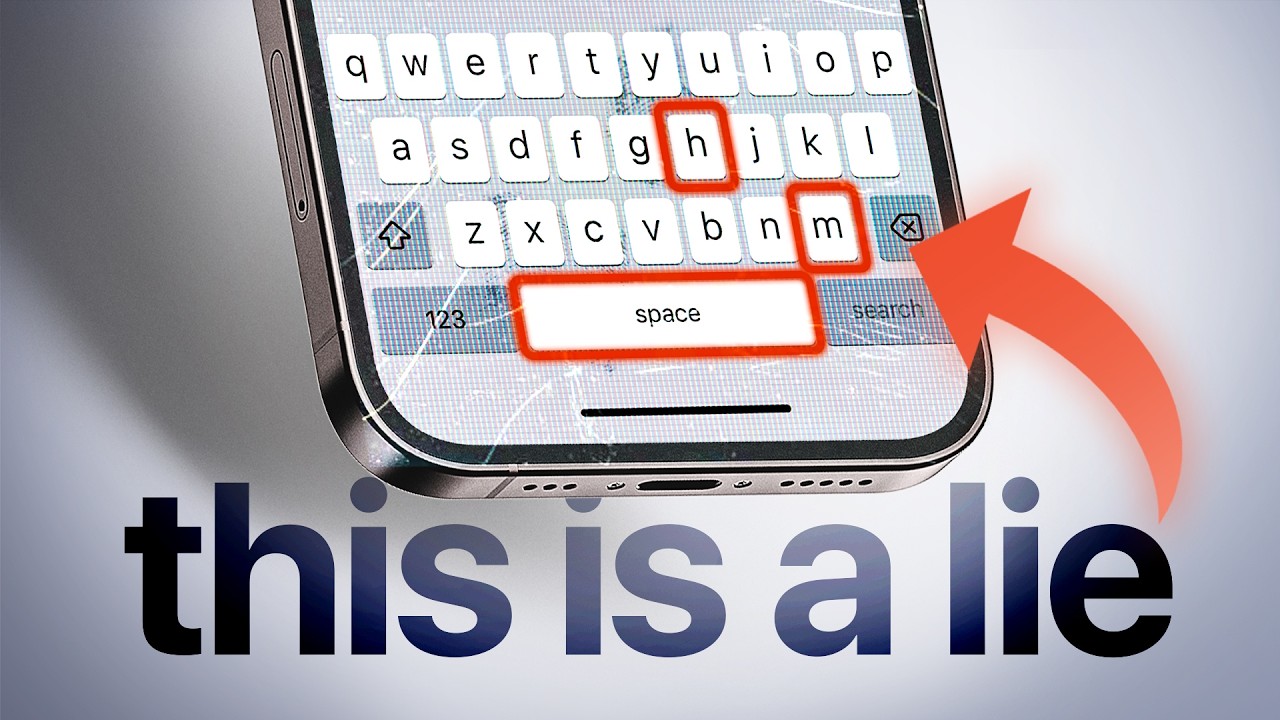
this is the keyboard on your mobile phone pretty standard you have letters and every time you chop on the rectangle of a letter that letter is stied easy right well that's wrong when the engineers building the first iPhone were designing the keyboard they tried just that and it was a disaster the keys were so small and clumped together and they were making so many mistakes that it was unusable and if they didn't get the keyboard right they knew the iPhone would flop but whatever crazy concept they tried it wasn't working and until an engineer named
Kev cenda comes along with a new prototype the keyboard looks totally normal but when they tested it it was working you could type without making mistakes what he made a keyboard that looked totally normal but the invisible touch areas that would register each letter if pressed we adjust it dynamically based on what was the most likely letter you were going to type next if you type th for example the hitbox of the letter e would be massively bigger the system is using the dictionary and a history of the words that that you type most to
figure out the most likely next letter and this is still what is powering the keyboard on your phone today behind the things you do every day thousands of times and that seems so simple there's a crazy hidden world of design engineering psychology copy nature tricks that play with your mind and details that make you think how the did they come up with that I'm enrio a product manager working in Tech and on this channel I go behind the scenes of the tech that you use every day and I promise you after this video you'll never
look at what's on your phone or computer the same way again but let's start simple what's the simplest thing you can do on your phone tapping a button easy right well so here we have a button for a calculator app on your phone okay but something looks off that's because we are missing a key component which is feedback anything happening on any interface needs feedback to confirm to the user that the system is working so let's throw that in wait now as soon as I tap the action still happens right away and that's not right
right we need to design our button so that the action activates not when we start a touch but when we end the touch so I can hold it down okay but this creates another problem what if while I'm touching down I move my finger away from the button if we don't do anything as soon as I release the finger even if it's outside the button it's going to type nine and this is wrong so let's add that in and also my fingers are not incredibly precise so I need to tap area around the buttons so
that when I press and I move around a bit it's safe and I have some wiggle room but hey what if I start a tap and go out and then go back into the button where logically it should give me feedback again and confirm the action and this single goddamn button has opened up a new whole world of decision details and design that 99.9% of people using technology just take for granted this is interaction design the art of making the interaction with computers which are cold precise and unforgiving machines closer to us humans and it's
everywhere even behind things you never really thought about so try and find where the typing cursor on this block of text is it's taking a while right well how about now the type in cursor we'll use blinks to make it easier to find on a page while we are address and not typing but as soon as I start to type it doesn't blink anymore if it did it would be distracting so it stays solid I've been using computers for 25 years and I just realized this in making this video The Core problem is that computers
and humans are on the opposite side of the spectrum we use intuition and Instinct and our brain has evolved to survive in the forest and hunts food not use Excel on a first day computers on the other hand are suckers for precision they're cold and calculating so in order to turn this into something a normal person can use designers and Engineers touch grass and they turn to copying nature but as it turns out copying nature is hard probably have come across swiping some things that just don't feel right like this one what is wrong here
this swipe lacks interruptibility when you start the swipe it just goes until the end but this is not how the real world Works Tak changing a page in a book which is the same motion if you're halfway you can just go back it's natural and this is why when something is welld designed you can really feel it it's almost working like magic for example the app switcher on the iPhone would never dismiss an app before you actually flick it off the screen and end the movement because all this wiping and flicking that we all got
used to is only here because technology was able to take our small monkey brains and rewire them let me explain take this screen right here in Spotify I can swipe left and right to change songs I can swipe down to close this panel and I can swipe up to see the lyrics now out of all of these swiping up for the lyrics is the only one that has an affordance which is this thing right here that is telling me hey there's more down here just scroll down to see it in the real world we rely
on affordances to tell us what to do a door handle is the most famous example of an affordance once you see it you know what to do 20 years ago most people were new to digital interfaces and so designers and Engineers had really to hammer memor it down and use very explicit affordances and metaphors to make people understand how to work with technology and the wildest example of that is Microsoft Bob what don't know of Microsoft Bob was an experimental system that was taking afford thises from The Real World and straight up making them digital
your desktop is literally a desktop your documents are literally documents your email is parrot this style is called skew morphism or using real word objects to give meaning to digital interfaces but nowadays we don't need this anymore we are so accustomed to digital interfaces that they were able to rewire our brain and if I show you this you know exactly what you can do scroll up tap here it's all hard wire into our brain but at the same time our ability to design interactions that emulate nature and are intuitive also help to get R of
affordances and skor ISM and this is what gave birth to the minimalistic design that we all use today but sometimes they take it too far and there's no way to know how you can interact with something do you know you can swipe on the player here in Spotify to change songs but sometimes copying nature turns out to be a complete mess another action that we do every day that hides an ungodly amount of complexity is scrolling in the past scrolling was like this clunky moving the page down in chunks when you use the scroll whe
on your mouse but the scrolling we have today the smoo one is called inertial scrolling and once again then by copying nature it works just like regular physics our fingers give speed to the page but just like a car is slowed down by friction of the tires with the road and air resistance it will eventually decelerate all the way to zero unless you're in space we are very used to this and that's why it feels so natural so let's build it here I have my position going down linearly and this looks so bad what's going
on here well it turns out that most of nature is not linear so we need to find the deceleration curve that feels natural and there's an infinite amount of them we can go square roots natural logarithms then use that and integrals to calculate velocity and position and getting to do something as simple as scrolling has now become a mathematical mess and just in case you want to flex at the next party the math function of the deceleration rate for scrolling in the iPhone is base 10 logarithms another property of nature is elasticity our skin is
elastic when you reach the end of a list it goes back to its original Place almost like there's a spring in there well this is another one where it's more complicated than it seems because the velocity of something controlled by a spring is not linear we need to model a spring system where to control the weight of the object the tensile strength of the spring so yes the physic you studed in high school is not totally useless but it's not only about nature because technology also uses something else to trick you your own psychology so
let's load something you're are waiting for your app to load and you get this wao this feels broken it was all empty and then all of a sudden an app appeared out of nowhere and also it took a very long time that's because we are not telling to the user that we are loading something so let's head a spinning wheel here we are all used to that and oh now it's clear it's a loading screen but we can take it this one step further we can trick your brain into making this loading time shorter without
actually making it shorter and for that we are going to use something called skeleton loaders they are these outlines of your interface that appear while you wait these actually make the loading take more time because you actually have to load and display all these animations but they trick your brain by giving it something to process in the meantime reducing the perceive time it takes for things to load and when things are loaded up you also have the benefit of already knowing what the structure of the page will be instead of having to process everything all
at once another psychology trick is fits law which states that the time required to move to a Target area is a function to the distance and the size of the target this is why important buttons are usually large large and close to where you're focusing so the more important the action the larger and closer it should be right the back button which is one of the most important ones on Android was historically here where your F could reach it but it was not huge but they used Fitz law to find a better solution swiping from
the edge of the screen that's how I go back on my phone instead of making the back button larger any edge of the screen will be always closer to your Thum and since you swipe from outside the screen the area is technically infinite but it's not only psychology that drives the design of things especially in the past technical limitations were driving how technology was designed and sometimes this decision just remain there for decades the mouse cursor the one we use to control our computers is an arrow that's pointing on the top left why why couldn't
it be pointing up or down or on another Corner well in computers The Anchor Point from which images are painted on a screen starts from the top left corner but in that case to calculate exactly where it's pointing you need to do a subtraction operation to calculate coordinates this is not a problem today but back in the day they saved some precious computations so they said it and made the arrow points to the top left now we are emulating nature using complex Tech using genius and carefully crafted designs and psychologist to make technology easier but
now there is another challenge on the horizon it took 15 years to build the natural interactions that we have today but now we have to start again from scratch the Apple Vision Pro and the quest free are creating new ways of interacting with augmented reality controllers are going away in favor of using your hands and creating natural ways to control these interfaces is the challenge of the next 10 years and as we go towards smart classes and true augmented reality this is going to make or break the successor to the smartphone for example we are
already seeing an agreement that this is a click and you can use it to drag things as well in the interface but then there's pieces that need to be figured out Apple wants to use it tracking and it's pretty cool but impossible to scale down to really smart glasses and keyboards well keyboards will be a real pain in the ass I tried meta's keyboard in the quest free and it's very frustrating to use and these small things that may seem like afterthoughts at what will make or break the next generation of devices because they are
what creates that feeling of magic and wonder oh and if you want to get a deeper dive on what will actually be the successor of the smartphone you can check out this other video right [Music] here