ComfyUI for Everything (other than stable diffusion)
62.6k views5088 WordsCopy TextShare
Design Input
Resources: https://bit.ly/comfyuiworkflowtemplates
Scrintal Workflow: https://beta.scrintal.com/b/c...
Video Transcript:
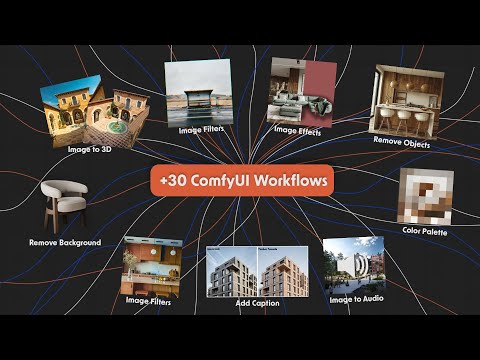
what you can do with comi other than using it for running stable diffusion I have collected almost 30 different use case things like image to text how to create a caption how to create sound effects direct from one image and some other ones are just as a simpler functions some effects filters or image enhancements quickly I will show all of the things I found myself using for the last month and how you can make your workflow even more complex with all of these functions so you don't need to go any other software other than comi let's start first one is lava if you don't know what lava is it's basically image to text model that can understand what is happening in the image and you can ask questions about that image so we have our main lava module here you need to download BL models to be able to use it and we can write our prompt in this part connect our image let's say we want to use this image and we can say things like describe the location of the image and what is happening and if we run it we will get something like the image features a sering seene with two small wooden cabins switched on the Steels of the forest they are positioned next to each other overlooking a picturesque leg or pond it's pretty accurate and we can you can also ask some other more detailed questions like maybe what are the buildings made out of buildings are made out of wood or we can maybe try uh with some different image as well uh there is really no limit to what you can ask let's put this image now and say maybe what is the style of the the image describe it as your structure with many windows and unique design it appears to be res or commercial building possibly office space and the building and it get cut because the maximum tokens is set as 40 we can increase it to maybe like 300 tokens and then it will or it may create longer output change 200 apparently 200 is the maximum one so we get a way longer output and with the temperature you can say how creative the model should be so this is the first one let's go to our second workflow in our second module I collected couple of different ways which you can use to remove background of different objects from any image you want to use in this case I will use this picture to remove background in the first two workflows uh we don't have control to Which object to keep and which object to remove uh it is kind of understanding on its own what is the main element in the image and then removes the background for that object in the second one we have couple of different models that we can choose some of them are for general purposes as you can see and for example this one is focused on the human segmentation which can be nice uh let's keep this one for now and the third one is slightly different than the first two because in this one we can actually prompt what we want to keep in the image let's say we want to keep the this armchair we can type as a armchair and then um if we generate it in the first one it decided to keep the armchair and this part of coffee table and the frame at the background in the second one just the armchair with this piece of wood here and in the third one it tried to only keep the armchair um but it also removed this part U we can try to fix this with the threshold value and so we can try to prompt it more add more detail but as we can see the quality wise is not as good as the first two but it is more flexible so it is up to you in which use cases which one makes more sense let's try to keep the poster on the wall one of the main reasons why I really like Ki is because it's just an empty canvas a tool for us you can do almost everything thing if you want to use it to take notes or create mood boards it's not really possible to do with confi but it's Brothers secr tal can help you with that secr tal is a visual not taking platform where you can place cards on your board and connect ideas together to document them better inside each card we can add list images PDFs videos and a few more option as well they have lots of templates for different kind of use cases like for um research about the blog post for example or how we can take lecture notes depending on the different topics here are my notes for this video on the board you can see it's really similar to confi and super flexible in terms of what you can do with it I have placed all of the resources materials and the custom extensions I used in the video here on this scrol board you can find the link in the video description thank you scrol for sponsoring this section of the video if you want to trade it out you can use the design 10 code for Discount okay let's continue our T module which is video to mask how we can remove the background of the video so in the first note we have our load video component which we can choose here to load our video in this case I have a video of this guy dancing so we can segment him from the background uh in this part we can choose the the frame rate we can keep it 24 or we can reduce it or make it higher and we can choose a limit of frames let's say you don't want to wait for the whole thing until when you are testing so we can set it like a 30 frames so it will only generate the first 30 frames of the video and then we are removing the background for all of the frames in this case instead of EET this the one we used previously I'm I'm going to use unit for the human segmentation model and then we going to merge all of the frames back to create our video so let's run it and of course depending on the length of the video this will take considerably longer because we are doing the same process for the each frame in this case we're going to do it 30 times you can see our guy completely removed from the background and also the alpha Channel version of it if you want to use it to maybe run through controller to create animation videos since this is only the first third frames it's not super long let's try maybe like a 90 frames with 15 FPS so we can do the whole video in this ones we can see all of the individual frames that generated and we end up with a video like this one so you have uh really total flexibility on the settings about the FPS and the frames and how you want to segmented basically let's continue our fourth module which is the LM part uh our text generator part I wanted to show a couple of different workflows for running different type of llm model models the first one is running totally locally on your computer or if you're using a server on your server and this case we are using this VM notes extensions we can easily install any models and then we can choose which model you want to use I have four of them installed right now the mixl and this one is trained especially for stable diffusion prompts it is not super cool but I can see how you might want to use it let's try this we have two prompt option one of them is the system prompt and the other one is a normal uh The Prompt we want to write in system prompt you can specify like what is the purpose uh what type of things you are trying and then here we can say maybe a things like create a prompt for building in desert covered with scent here uh again similar to Lava we have couple of options to give the maximum tokens the temperature and and bunch of other settings so let's run it and we have our prompt I mean it's bunch of different things happening here but I think it's a pretty decent one from model running locally let's try another one maybe mix when we get a prom like uh it actually put image generator prompt it's a decent prompt I think we can totally use it so let's go to our second option our note is called generate stable diffusion prom with llm this one is a bit more different because we are actually using another service to run our llm so it's not running locally but this one is using a platform called open t. aai in the parameters the last one we can choose which model we want to use and actually there are lots of them that we can try like the one we used previously and they even have GPT 3. 5 turbo gini Pro Cloud Etc and some of them are saying like three run these ones and I think the rest for example like GPT 3.
turbo you have some kind of limit set it to your account so far I'm able to use it without any issues so you can try to check it all you need to do in this platform uh you need copy API and go to a config file you need to paste your key here after that it should work again we have the our system prompts here and on the top we can type our prompt so I will just use the same ones we used here and let's try for example one of the three ones M and run get our prompt it's a similar prompt what we get here because it's the same model and let's try to use for example GPT 3. 5 turbo we get our respond back our sty realism I think because of this prompt uh it's creating a this categorize here so maybe let's remove it and send it again and now with the update prompt we get a detailed a nice prompt you may think like why I should use GPT here instead of the chat version directly I see all of these extensions like a component of like a complete workflow so if you have all of these components like lava which you can get information from your images or llms or background removals and other things we going to cover they just become a tool that we can connect them together and create something way more complex so let's continue and in the last one um we have a note from mixlab the chat GPT note uh here you can directly place your API key that you can get from open Ai and then then basically use GPT 3. 5 3.
Related Videos

1:18:44
Master AI image generation - ComfyUI FULL ...
AI Search
286,515 views
37:42
How To Create Real-Time Renders with AI (s...
Design Input
20,829 views
17:40
3D Gaussian Splatting! - Computerphile
Computerphile
182,416 views
1:53:35
ComfyUI in Nuke | TD Meetup 10
TD Academy
6,816 views
37:33
The Most IMPORTANT Advice for 3D Artists |...
The VFX Process
70,728 views

34:48
How I PREP D&D with Obsidian
Mystic Arts
96,183 views
54:40
Master ControlNet: Transform Your AI Image...
Code Crafters Corner
4,052 views

13:11
MSTY Makes Ollama Better
Matt Williams
44,372 views
12:52
Create CONSISTENT CHARACTERS for your proj...
Mickmumpitz
364,958 views
![Control MULTIPLE CONSISTENT CHARACTERS + CAMERA with this FREE AI Workflow [Blender + ComfyUI]](https://img.youtube.com/vi/PZVs4lqG6LA/mqdefault.jpg)
26:31
Control MULTIPLE CONSISTENT CHARACTERS + C...
Mickmumpitz
141,103 views
34:11
Stable Diffusion ComfyUi Control Net Deep ...
Alphonso Peluso
6,887 views
58:31
Stable Diffusion + ControlNET in Architecture
ArchViz
48,288 views

25:19
ComfyUI: Advanced understanding Part 2
Latent Vision
65,307 views
17:34
How to Use Stable Diffusion Locally (Singl...
Design Input
7,090 views

20:38
ComfyUI Tutorial Series: Ep03 - TXT2IMG Ba...
pixaroma
49,847 views

19:30
Comfyui 101: Master Comfyui in 2025 with T...
Monzon Media
16,488 views
24:34
Hyper Stable Diffusion with Blender & any ...
Andrea Baioni
76,269 views
19:20
ACE++ LORA is more than just a FACESWAP OR...
AI Jigyasa
2,924 views
18:42
Image stability and repeatability (ComfyUI...
Latent Vision
80,153 views
19:59
AI Architecture - Ideas to renders in seco...
LightSketch
7,911 views